QuantiMeet Review (2026): Hosted Cal.diy at a Flat CA$10 per Team

QuantiMeet is a hosted scheduling service built on the MIT-licensed Cal.diy engine, priced at a flat CA$10 a month per team with unlimited members. QuantiMeet's team runs the servers, applies the security updates and keeps nightly encrypted backups off-server, so you get Cal.diy's booking pages without operating Cal.diy yourself. It is new: the beta opened on 22 September 2026 and public launch is 20 October 2026. Round-robin and collective event types went live on 3 October, according to QuantiMeet.
We tested the beta on 3 October 2026 in a workspace we signed up for through QuantiMeet's "Join the beta" flow, the same way a real team would. We covered event types, availability, the public booking page on desktop and mobile, a real booking with its emails, the video room, the app store, API keys and security settings. QuantiMeet is operated by 1607726 B.C. Ltd., doing business as QuantiMeet, Courtenay, British Columbia, and is not affiliated with Cal.com, Inc.
Quick verdict
Choose QuantiMeet if you want Cal.diy's booking pages for a team without running a server, and per-seat pricing is what you're trying to escape. One flat price covers everyone, and QuantiMeet's team handles the updates and backups.
Look elsewhere if you need routing forms, a workflow builder, payments on bookings or SSO today (Calendly Teams or Cal.com Teams), or if your booking data has to stay on a server you control (self-host Cal.diy).
Why a hosted Cal.diy exists
When Cal.com took its commercial code closed source in April 2026, the public repository became Cal.diy, relicensed to MIT. The MIT license allows commercial use, but the cal.diy site recommends the project for personal, non-production use, and says Cal.com, Inc. does not guarantee its security. If you self-host it for a business, the patching, the backups and the risk are yours.
QuantiMeet's answer is to keep the engine and take over the operations. Simon, QuantiMeet's founder, described the setup to us like this:
- Security updates are applied by QuantiMeet, not by the customer.
- Every team gets its own isolated database, with its own credentials. Your bookings are not in a shared table with other customers' data.
- Nightly encrypted backups are shipped off-server, and QuantiMeet says the restore has been rehearsed, not just scheduled. The Terms commit to daily backups and tested restores.
- Servers are in Canada, on infrastructure QuantiMeet operates itself.
- Calendar tokens are encrypted with your team's own key, according to QuantiMeet's feature list.
"The engine is what Cal.diy ships, the operations around it are ours." Simon, founder of QuantiMeet, in an email to use-apify.com, September 2026
That is the real product here. If you were going to self-host Cal.diy for a small business and dreaded owning the backups, this is the trade.
QuantiMeet hands-on test: what we found
Event types and availability
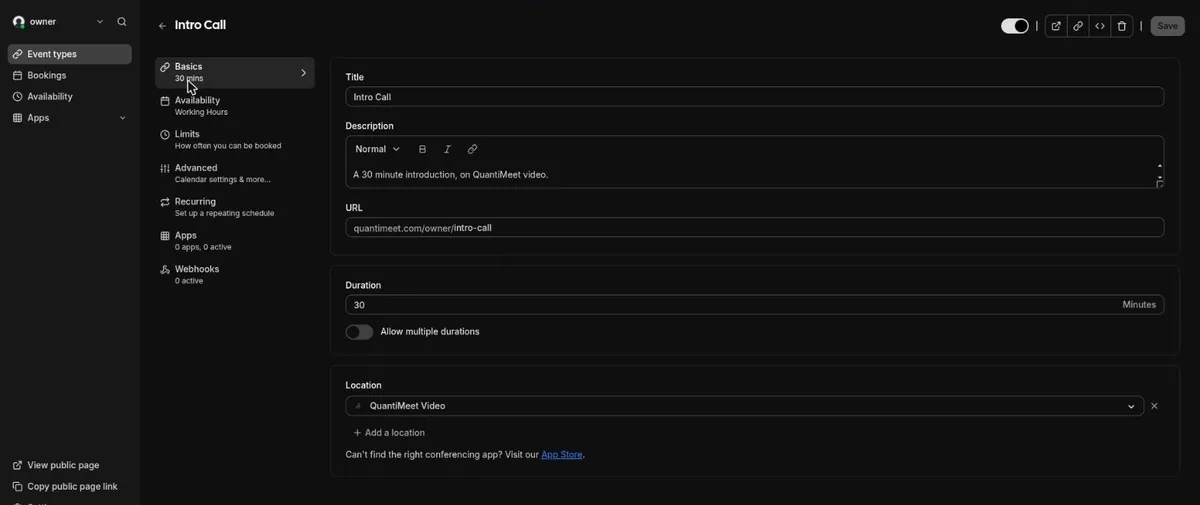
The dashboard is Cal.diy's, rebranded. A new workspace comes with a 30-minute "Intro Call" event type on QuantiMeet video and a Monday-to-Friday, 9:00 to 17:00 working-hours schedule. The event-type editor keeps Cal.diy's settings, including durations, booking limits, recurring events, booking questions, confirmation requirements, seats, private links and webhooks.

The public booking page
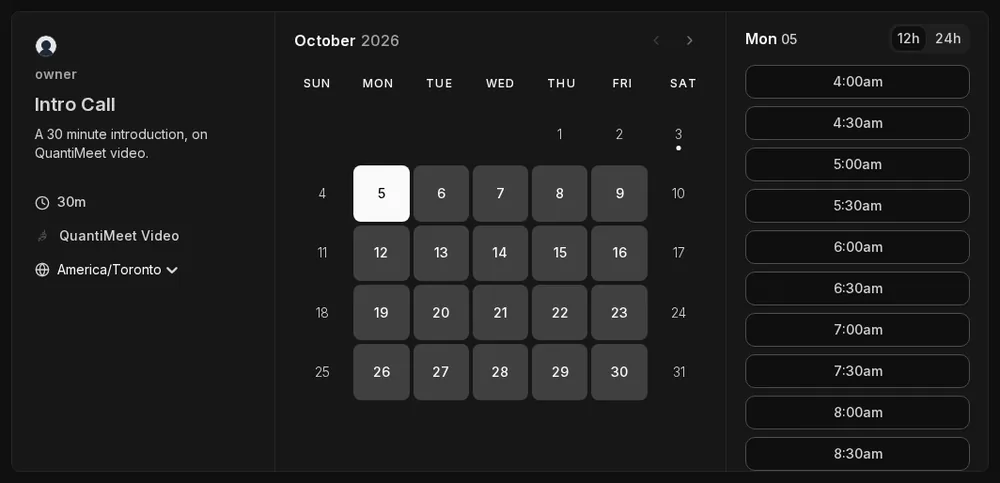
The booking page is the familiar Cal.diy layout: event details on the left, a month calendar, and time slots on the right, with 12h/24h switching and month, weekly and column views. Time zones work as they should. Our host schedule was 9:00 to 17:00 Casablanca time, and a visitor browser set to Toronto saw the same slots starting at 4:00am local time; set to Vancouver, they started at 1:00am.
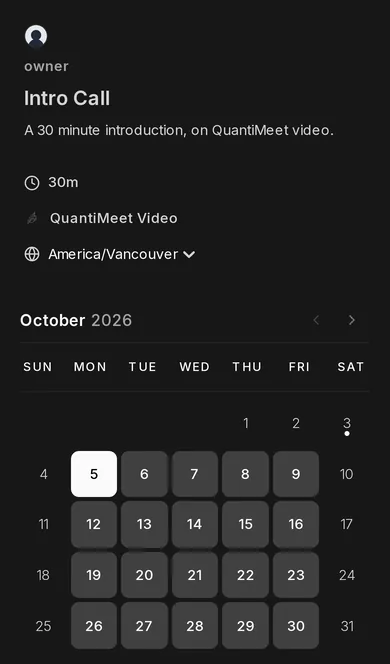
On a phone-sized screen the layout stacks cleanly: details first, then the calendar, then the slots.
A real booking, its emails and the video room
We booked a slot on our own workspace. Both the guest and the organizer received a confirmation email with the date, time zone, a reschedule link, a cancel link and the meeting URL. Cancelling from the bookings list worked; it asks for a reason, which is shared with the guest.

The meeting URL points to meet.quantimeet.com, a self-hosted Jitsi Meet server that QuantiMeet runs. Guests join with just a name, no account. QuantiMeet says video runs on its own servers in Canada, is included in the plan and is unmetered. If your team lives in Google Meet, Zoom or Teams, note that QuantiMeet lists connecting those as a future addition rather than a current feature.

Apps, calendar sync and the API
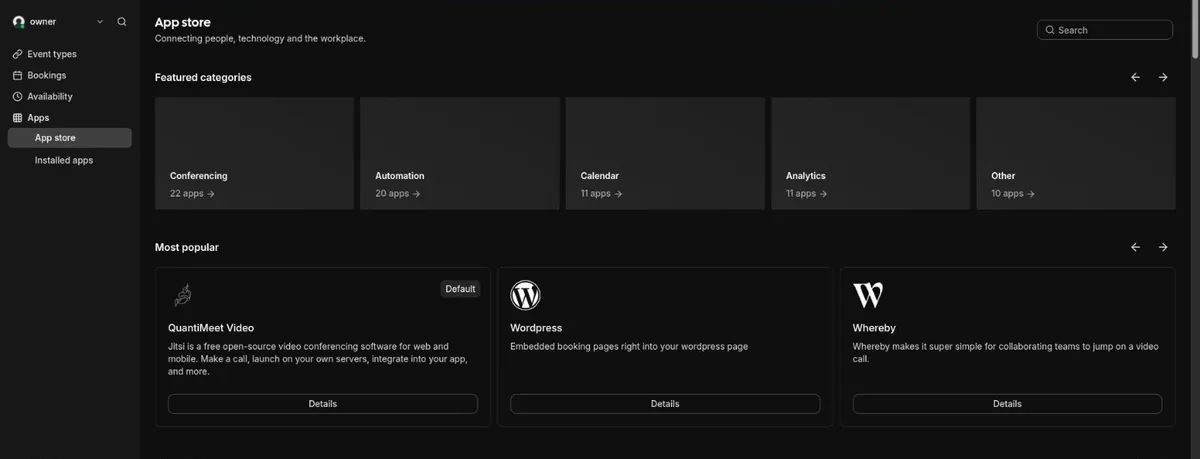
The app store is Cal.diy's catalogue, with calendar, conferencing, analytics, payment and automation apps. Google Calendar and Outlook two-way sync are marked beta on QuantiMeet's own feature list. We did not connect a calendar during this test. If calendar sync is the reason you're switching, connect a calendar and check that busy times block slots before you move your booking links.
Per-team API keys are in beta. Each team creates keys in its own dashboard and uses them on its own workspace address. The Terms say there are no per-request fees or overage charges, and that QuantiMeet throttles with warning headers rather than suspending accounts that hit the fair-use limits.

Security settings
Two-factor authentication is available but off by default. A banner across the dashboard reminds the owner that their account can see every booking and asks them to turn it on, which is a sensible nudge. Turn it on.
QuantiMeet features: what's live and what isn't
QuantiMeet publishes a feature-status list on its homepage, which makes it easy to check what you are buying. As of 3 October 2026:
| Feature | Status |
|---|---|
| Booking pages, availability, time zones | Live |
| Video on every booking (self-hosted Jitsi) | Live |
| Booking confirmation and cancellation emails | Live (tested) |
| Isolated database per team, nightly backups | Live |
| Google Calendar and Outlook sync | Beta |
| Per-team API keys | Beta |
| Round-robin and collective events | Live since 3 October 2026, per QuantiMeet |
| Automated reminder emails | Being built |
| Routing forms | Being built |
| Workflow / automation builder | Not in the launch version |
| Taking payment on a booking | Being built |
| SAML single sign-on | Being built |
| Importer from Cal.com | Being built |
Feature status from quantimeet.com and QuantiMeet's Calendly comparison, checked 3 October 2026, plus what QuantiMeet's founder told us directly. QuantiMeet confirmed on 13 October 2026 that automated reminder emails are not in the launch version; confirmation, reschedule and cancellation emails are.
QuantiMeet says round-robin and collective events went live on 3 October 2026, on every workspace: a Members area, plus an Assignment tab on each event type where you pick round-robin or collective and choose the hosts. If your team needs routing forms today, Calendly Teams has them and QuantiMeet does not yet.
QuantiMeet pricing
QuantiMeet has one plan, priced per team: CA$10/month subject to change · verified 2026-10-03, with unlimited team members and all features included. Prices are in Canadian dollars, with tax added where the law requires, and billing is monthly in advance through Stripe.
- Launch promo: teams that subscribe between 20 October and 20 November 2026 pay CA$5 a month for their first six months, then CA$10 a month. Anyone who joins the launch list at quantimeet.com before 20 October keeps that rate even if they subscribe after 20 November.
- Beta (the first 25 teams): free from Beta Day on 22 September 2026 until 20 April 2027, then CA$10 a month. 24 of 25 beta spots were taken on 13 October 2026.
- Price lock: the price you subscribe at is the price you keep for as long as your subscription stays active. Future increases apply to new customers only.
- Premium options: a dedicated instance or a chosen data location are priced separately when offered.
The flat price is the argument. QuantiMeet's comparison page works it through for ten people. Calendly Teams costs US$20 per seat billed monthly or US$16 billed yearly, so ten hosts pay US$160 to US$200 a month. QuantiMeet charges CA$10 a month for the whole team. Those Calendly prices are as published on 23 September 2026, and neither QuantiMeet nor we convert between the two currencies. The price gap is real, and so is the feature gap in the table above, so weigh them together.
The Fair Pricing Pledge is in the contract
QuantiMeet's Terms of Service make its pricing promises binding, and say the Pledge wins over any conflicting clause:
- Your data is yours: full export at any time in open, machine-readable formats, from the dashboard or the API, at no charge.
- 30 days' written notice before any material change to the service, the Terms or the Privacy Policy. If you don't accept a change, you can cancel and get back anything prepaid for the period after cancellation.
- One-click cancellation from the dashboard, effective at the end of the billing period, with no retention flow.
- No bait and switch: QuantiMeet will not remove features from your plan and sell them back as an add-on.
- Leaving: after you cancel, you can export for 30 days. Data is then deleted from live systems and ages out of backups within 35 days.
QuantiMeet vs self-hosting Cal.diy vs Calendly
| QuantiMeet | Self-hosted Cal.diy | Calendly Teams | |
|---|---|---|---|
| Price for 10 people | CA$10/month flat | $0 software, plus a VPS (we suggest 4 GB as a floor) | US$16/seat/month yearly, US$20 monthly |
| Engine | Cal.diy (MIT) | Cal.diy (MIT) | Proprietary |
| Who patches, backs up, restores | QuantiMeet | You | Calendly |
| Where data lives | QuantiMeet's servers in Canada, a database per team | Your server | Calendly's cloud |
| Round-robin and collective events | Yes, since 3 October 2026 (per QuantiMeet) | No (removed from the MIT edition) | Yes |
| Routing forms | Being built | No | Yes |
| Video | Self-hosted Jitsi, included | Bring your own (Jitsi, Zoom, Meet apps) | Zoom, Meet or Teams integrations |
| Track record | Beta since September 2026 | Cal.com codebase since 2021 | Established vendor |
Calendly prices from calendly.com/pricing, checked 26 September 2026. The self-hosted column is covered in detail in our Cal.diy Docker Compose guide.
Who QuantiMeet is for, and who should wait
A good fit if:
- You're a small team paying per seat for Calendly or Cal.com mostly for booking pages and video, and the per-seat bill is the problem.
- You want to share bookings across a team at one price. QuantiMeet says round-robin and collective events went live on 3 October 2026, and it charges the same CA$10 a month whether you have 3 hosts or 30.
- You wanted Cal.diy's booking pages for a business but didn't want to own the patching, backups and restores that its maintainers warn about.
- You want data in a Canadian-hosted, per-team database and a price written into the contract.
- You're comfortable adopting a young product and giving feedback on features that only just shipped, such as round-robin.
Not a fit, for now, if:
- You need routing forms or automated workflows today, or round-robin with a long track record. Calendly Teams or Cal.com Teams are the honest answer for now.
- You need to take payment on bookings, or SAML single sign-on.
- You're one person who is happy with a free plan: Cal.com's free cloud plan already covers unlimited event types for a single user.
- Your policy requires booking data on servers you control. Then self-host Cal.diy and own the operations.
Is QuantiMeet worth it? Our verdict
QuantiMeet takes the open-source Cal.diy engine, which its maintainers recommend only for non-production use, and puts a small company's operations around it: updates, isolated databases, off-server backups and Canadian hosting, for CA$10 a month regardless of team size. The core booking flow worked in our test, from the booking page to the emails and the Jitsi room, and the pricing promises are written into the Terms rather than left on a marketing page.
The trade-off is maturity. Round-robin and collective events only went live on 3 October, and calendar sync is in beta. If your team mainly needs good booking pages and video, and per-seat pricing is what hurts, QuantiMeet is worth a trial now. If you need routing forms or workflows, check the feature list again after the 20 October launch.
See QuantiMeet's plan and live feature list →
Cal.com, Inc. does not offer one: Cal.diy is the self-hosted MIT edition, and Cal.com's own cloud runs the closed-source product. Because the MIT license allows commercial use, independent companies can run Cal.diy as a service. QuantiMeet is one of them, at CA$10 a month per team.
QuantiMeet is a hosted service, not an open-source project. It is built on open-source software, including the MIT-licensed Cal.diy scheduling engine, and its Terms say those licences and their notices are preserved in the software. You use it as a subscription; you do not get a QuantiMeet codebase to self-host.
No. QuantiMeet's Terms state that it is an independent product and is not affiliated with, endorsed by, or sponsored by Cal.com, Inc. It runs the Cal.diy engine that Cal.com published under the MIT license in April 2026.
1607726 B.C. Ltd., doing business as QuantiMeet, a British Columbia company based in Courtenay, British Columbia, Canada.
On infrastructure QuantiMeet operates in Canada. Each team gets its own isolated database, and QuantiMeet keeps nightly encrypted backups off-server with tested restores. Video calls also run on QuantiMeet's own servers. A chosen data location is offered as a separately priced premium option.
CA$10 a month per team, in Canadian dollars plus applicable tax, with unlimited users and all features. Teams that subscribe between 20 October and 20 November 2026 pay CA$5 a month for their first six months, then CA$10, and anyone who joins the launch list at quantimeet.com before 20 October keeps that rate even if they subscribe after 20 November. The price you subscribe at is locked for as long as your subscription stays active.
Yes, according to QuantiMeet. Its founder told us round-robin and collective (all-hosts) event types went live on every workspace on 3 October 2026, with hosts chosen on each event type's Assignment tab. Routing forms are still being built, and a workflow automation builder is not part of the launch version.
QuantiMeet Video is a self-hosted Jitsi Meet server at meet.quantimeet.com. Every booking gets its own room, guests join without an account, and video is included in the plan and unmetered. Connecting Google Meet, Zoom or Microsoft Teams instead is listed by QuantiMeet as a future addition.
Yes. The Terms let you export all your data at any time in open, machine-readable formats, from the dashboard or the API, at no charge, and cancel in one click. After cancellation you can still export for 30 days; data is then deleted from live systems and ages out of backups within 35 days.
It depends on who you want running it. Self-hosted Cal.diy costs nothing but a server and keeps data on infrastructure you control, but you own the updates, backups and security, and its maintainers recommend it for non-production use. QuantiMeet charges CA$10 a month per team and takes over those operations. Self-hosted Cal.diy has no round-robin; QuantiMeet says it added round-robin and collective events on 3 October 2026.